Reddit SEO
 Wordpress
 WooCommerce
 Shopify
 Magento
 BigCommerce
 HubSpot
 Neto
Neto
 Headless
 ChatGPT
 Gemini
Most guides to AI skills read like feature lists. We run these across 1,000+ Australian client audits and found the value isn't in the skill itself, it's in knowing which five buckets are worth building and which ones are nice-to-have at best. This is what we'll cover in this blog:
- What a Claude SEO Skill Actually Is
- How a Claude SEO Skill Actually Works (in One Screenshot)
- The Skills We Run for Audits
- The Skills We Run for Keyword Research and Cluster Scoping
- The Skills We Run for Content Design and Voice
- The Skills We Run for Internal Linking
- The Skills We Run for Competitor and Info-Gain Analysis
- Where to Grab Pre-Built Skills
- Combining Skills into Workflows
- Common Mistakes We See
- The Anatomy of a Claude SEO Skill File
- FAQs
TL;DR
-
A Claude SEO skill is a saved workflow you invoke by name. Same instructions every time. Repeatable across clients, versions, and team members.
- The skills that actually move rankings sit in five buckets: technical audit, keyword research, content design, internal linking, and competitor analysis. Anything outside those buckets is nice-to-have.
- Pre-built skills at Hawk Academy save you the syntax fight. Build your own when the pre-built version does not match your process.
What a Claude SEO Skill Actually Is
A Claude skill is a saved workflow. It lives as a Markdown file with a description at the top and instructions in the body. When you type a trigger phrase in Claude Code or Claude Desktop, Claude loads the skill's instructions and follows them.
Think of a skill as a run book. The prompt is a snowflake. The skill is a document your whole team runs the same way.
Every skill has four parts: a name, a description that tells Claude when to load it, the instructions Claude follows, and any supporting files (templates, examples, reference tables). Any team member can invoke any skill by trigger phrase, and the output stays consistent.
The point is not that the AI is smarter than your best practitioner. The point is that the mechanical work runs the same way, every time, without the practitioner having to remember every checkpoint.
How A Claude SEO Skill Actually Works (In One Screenshot)
Say we have a skill called technical-seo-audit. Its description reads: "Run a full technical SEO audit against a URL. Covers indexation, canonicals, schema, Core Web Vitals, and internal link topology."
When a team member types "run a technical audit on studiohawk.com.au", Claude picks the skill (the description matches the request), loads the instructions, and executes them. In our case that means calling the SiteOne Crawler MCP for the crawl, the Google Search Console MCP for indexation status, DataForSEO for on-page checks, and returning a scored report against our house checklist.
That is the loop: describe the work, Claude picks the skill, skill runs the process, output is consistent.
The Skills We Run for Audits
Three skills sit in the audit bucket.
-
Technical SEO audit. The one above. Runs against a full domain or a single URL. Output is a scored report with prioritised actions. Uses SiteOne Crawler for the crawl and DataForSEO for the on-page verification. Cross-checks against Google's Search Quality Rater Guidelines.
- Content audit. Reads every URL in /blog/ (or a nominated section), pulls Google Search Console data for each, and produces a table of decaying pages, striking-distance queries, and cannibalisation candidates. This is the skill that shows us which pages to refresh next.
- Schema audit. Checks structured data across the site against schema.org validity, Rich Results eligibility, and internal consistency (same organisation schema on every page, breadcrumbs correct, article schema on articles). Highlights missing schema types.
We run the technical audit skill on every new client in week one. It is the fastest way to identify the ten to fifteen things wrong with the site that are cheap to fix and worth doing before anything else.
The Skills We Run for Keyword Research And Cluster Scoping
Two skills.
-
Keyword clustering. Takes a seed keyword, pulls DataForSEO and Ahrefs data via MCP, and outputs a pillar-plus-spoke cluster with URLs, volumes, and difficulty per piece. Includes a topical map spreadsheet as a supporting file so the output has a spreadsheet the strategist can hand to the writer.
- Striking distance. Pulls Google Search Console data via the SEO Gets MCP (which bypasses the 1,000-row GSC cap and returns 16-plus months of history). Returns the queries where the site sits at positions 4 to 20. Ranks by impression volume so the highest-leverage queries are on top.
The clustering skill is where we start on any new brief. The striking-distance skill is what we run monthly on retainer clients. Both replace what used to be days of spreadsheet work with a fifteen-minute chat session.
The Skills We Run for Design And Voice
Two skills.
-
Content design. Takes a target keyword, a competitor set (which the skill scrapes fresh each time), and a brand voice profile. Outputs a nine-layer content design spec: reading pattern, heading hierarchy, passage architecture, information-gain placement, visual specs, scannability rules, anti-pattern check, page-type template, and handoff rules. This is the structural spec the writer starts from.
- Info-gain analysis. Similar input, different output. Scrapes the top 3 to 5 ranking pages for the target keyword, builds a competitive matrix, and identifies the specific angles no competing page covers. Those are the angles the piece needs to lead with.
Content design and info-gain are what we invoke on every new blog piece before writing starts. Voice runs on the draft. Together they replace the "brief the writer" step with a runnable process.
The Skills We Run for Internal Linking
One skill, and it earns its keep.
-
Internal linking. Reads the entire site's article link map (a JSON file we maintain with primary and secondary anchor variants per URL), scans a new or refreshed piece for matching keywords, and returns a suggested list of internal links with anchor text and placement. Includes the 75/25 rule: roughly 75 percent primary keyword, roughly 25 percent long-tail variants. Links on the first occurrence of a matching keyword only.
The version we run cross-checks against a 180-mapping internal linking framework we built specifically for studiohawk.com.au. Every new post gets between three and five internal links, and every piece is pre-registered with ten to twenty-five anchor variants for future inbound links.
Before this skill existed, internal linking was the thing that got skipped on tight deadlines. Now it is a five-minute step at the end of every draft.
The Skills We Run for Competitor And Info-Gain Analysis
Two skills that are close cousins.
-
Competitor analysis. Given a competitor domain, pulls their top pages, backlink profile, and content themes. Returns a report on what they rank for that we do not, where their content is thinner than ours, and where we have zero coverage. Uses Ahrefs and DataForSEO MCPs.
- AI citation research. Runs a set of prompts through ChatGPT, Google AI Mode, Perplexity, Gemini, Claude, and Copilot. Records which brands each engine cites for each prompt. Compares the citation share to the client's target competitor set. This is how we monitor AI search visibility beyond the surface-level "are we cited yes or no" question.
The AI citation research skill is the one that took the longest to build and the one we use every month for enterprise clients. It replaces PEEC.ai for smaller clients where prompt volume does not justify a scaled subscription.
Where to Grab Pre-Built Skills
Two paths.
-
Hawk Academy skills library. We maintain a public library at hawkacademy.co/claude-seo-skills. Covers audits, keyword research, content design, internal linking, competitor analysis. Each skill ships with a description, instructions, and any supporting files. Install by copying to ~/.claude/skills//.
- Build from scratch. Every skill is a Markdown file. The syntax is simple. The steep part is knowing what to put in the instructions. A skill that reads "audit this page" gets you nothing. A skill that specifies the checklist, the output format, the tools to call, and the escalation rules gets you a repeatable process.
For most SEO managers, the right answer is: start with the Hawk Academy pre-built versions, learn what makes them work, then modify them for your context. Building from scratch is the wrong first step.
Combining Skills into Workflows
Individual skills earn their keep. Combinations compound.
The pattern we run at StudioHawk: a content audit skill identifies the top 20 pages worth refreshing, an info-gain skill runs on each URL to find the specific angles missing, a content design skill produces a structural spec for each refresh, and a voice skill handles the first draft. Four skills, one continuous workflow. Twenty pages of prioritised refresh work in about half a day.
The trick is designing skills that hand off cleanly. Skill A's output should match skill B's input format. If the content audit skill produces a URL list, the info-gain skill needs to accept a URL list. Chain the outputs and you replace what used to be a full-week planning session with an hour-long automated pipeline.
Skills that do not compose are individual power tools. Skills that compose are an assembly line.
Common Mistakes We See
Six that come up repeatedly.
-
The kitchen-sink skill. One skill that tries to run the whole SEO process. Reads like a mission statement, produces mush. Split into focused skills that do one thing well.
- No output format specification. The skill returns free-form prose that varies every run. Nobody can automate downstream because the shape changes. Spec the output format explicitly (JSON, table, Markdown with specific headings) and stick to it.
- Chatty descriptions. The description field is what Claude uses to pick the skill. If it reads like a blog post opener, Claude will not know when to load it. Write descriptions like a slash command help text: dense, specific, action-oriented.
- Skills that pretend to have data they do not. A skill that references "the latest GSC data" without an MCP call is guessing. Either integrate a real data source or say the skill needs the data pasted in.
- No versioning. A skill that lives on one team member's laptop and evolves without git history dies with that team member. Every skill in a git repo. Every change via pull request.
- Building before pre-building. Weeks spent writing an audit skill from scratch when a decent one already exists in the Hawk Academy library. Grab the pre-built version, modify it, save the time for the workflows nobody has written yet.
The Anatomy of a Claude SEO Skill File
If you want to build your own, here is the skeleton every skill follows.
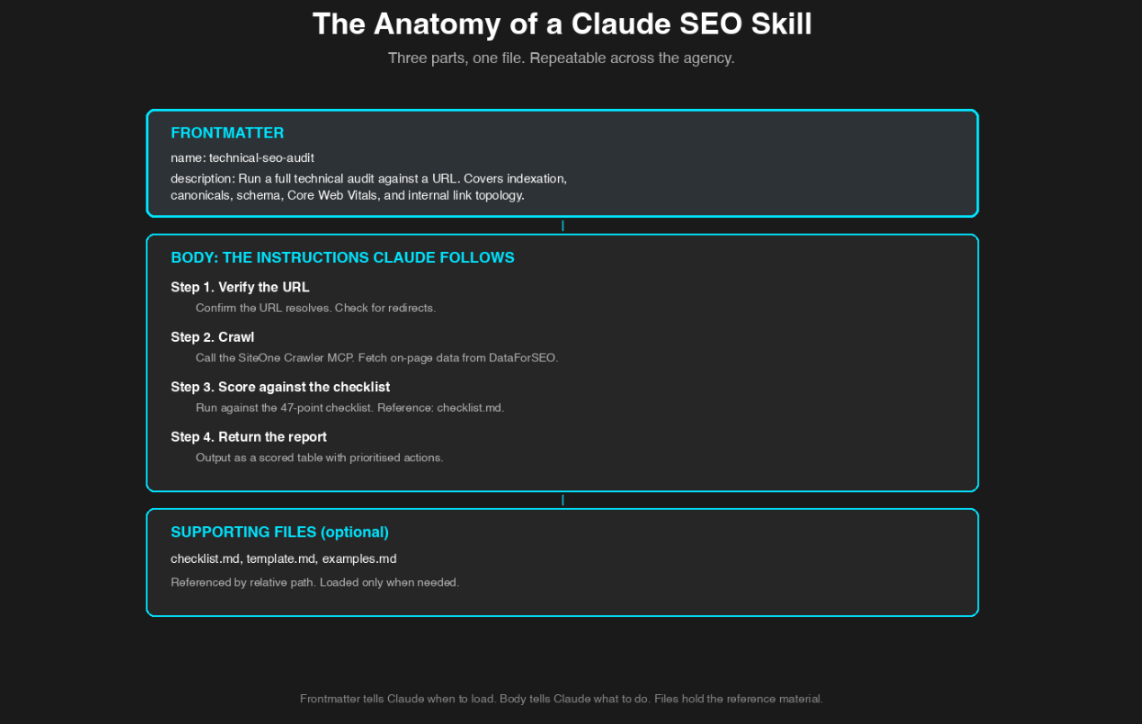
Three parts, one file. The same shape every time.
The frontmatter (name and description) tells Claude when to load the skill. The body tells Claude what to do. Supporting files sit in the same directory and get referenced by relative path.
Two rules that make skills work.
Be specific. "Run an audit" is not a skill. It is a wish. "Run against these 47 checkpoints, in this order, and return the output in this JSON format" is a skill.
Handle escalation. A skill needs to know when to stop and ask the human. If the audit finds nothing, does it re-run, ask for a different URL, or return an empty report? Say so explicitly.
"The mistake we made early was writing skills that read like prompts. Chatty, open-ended, hoping the AI would fill in the gaps. The skills that actually work read like technical documentation: rigid, specific, testable. Once we made that switch, our output quality jumped and new team members could ship agency-grade audits in their first week."
Harry Sanders, Founder, StudioHawk.
FAQs
What SEO work can Claude automate?
The repeatable 80 percent: technical audits, content audits, keyword clustering, striking-distance identification, content design specs, info-gain analysis, internal linking suggestions, schema generation, and first drafts of structured content. What stays human: strategy, brand voice on final copy, journalist outreach, and client conversations. The dividing line is simple. If the task runs the same way every time, a skill can automate it.
Can a Claude skill replace an SEO tool like Ahrefs or Semrush?
No. A skill is a workflow layer. The data still has to come from somewhere. Claude skills call MCPs (like the Ahrefs MCP, or the Google Search Console MCP) to get the data. Then the skill processes it. Without the underlying data sources, the skill has nothing to work with.
Do I need Claude Code or does the chat app work for skills?
Both work. Claude Desktop supports skills natively. Claude Code adds the ability to touch files on your machine, run scheduled jobs, and integrate with git. Most SEO managers start in Claude Desktop and move to Claude Code once the workflow needs to touch real data.
Are Claude skills the same as ChatGPT custom GPTs?
Conceptually similar (a saved workflow you can invoke by name), but Claude skills are Markdown files you own and can version-control. Custom GPTs live in ChatGPT's platform. Skills are more portable, easier to share across a team, and can reference supporting files. If you want to build a team workflow, skills are the better shape.
How many skills should an SEO manager have?
Fewer than you think. Five to ten well-built skills covering audits, keyword research, content design, internal linking, and competitor analysis will handle 80 percent of a practitioner's repeatable work. More than that and the collection gets hard to remember and maintain.
Can I share a skill with the rest of my team?
Yes. Push the skill's directory to a git repo. Each team member clones it into ~/.claude/skills/. Every teammate now has the same skill available. Version control is one of the reasons skills work for teams and one-off prompts do not.
What if my skill produces bad output?
Rewrite the instructions. Be more specific. Add examples. Move long reference content into supporting files. Test against the same input three times. If the output is still bad, the workflow itself is probably not well-defined enough to hand to Claude. In that case, do the task manually until you understand the process well enough to write it down.
And don't forget, you can always reach out here for a free SEO & AI Masterplan for your website.