Reddit SEO
 Wordpress
 WooCommerce
 Shopify
 Magento
 BigCommerce
 HubSpot
 Neto
Neto
 Headless
 ChatGPT
 Gemini
Heard all the hype about Claude Code but not sure where to start? This blog breaks down exactly what to try first, how to prompt it, and when to move from simple tasks to more complex ones.
TL;DR
-
Getting Claude set up to do useful SEO work takes about fifteen minutes. The five tasks below are the ones we run every week: content audit, striking distance, content design, first draft, internal linking.
- Start in Claude Desktop with the chat app. Move to Claude Code when the workflow needs to touch real files or run on a schedule.
- The upgrade path is: prompt, then saved skill, then Claude Code with MCPs. Skip steps at your peril.
This is what we'll cover:
What Claude Can and Cannot Do for SEO (Before You Start)
Can Claude do SEO? Yes, with a caveat. Claude is a workflow layer. It runs the mechanical parts of SEO work faster and more consistently than doing them by hand. That covers content audits, keyword grouping, information-gain analysis, content briefs, internal linking suggestions, schema generation, and first drafts of structured content. Doing SEO with Claude means directing that workflow layer, not handing the campaign to a robot.
Claude does not replace strategy calls with the client, judgement about which keywords are worth chasing, brand voice on final copy, or human relationships in outreach. Those stay with the practitioner.
The five tasks below are the ones that give a working SEO manager the fastest return on Claude. Not every SEO task Claude can help with. The five that ship the most value per minute of setup.
Getting Set Up in 15 Minutes
Two paths depending on what you want.
Claude Desktop only (chat app). Sign up, install the app, open a new project. You can run every task below in the chat. This is enough for exploration and occasional runs.
Claude Code (CLI). Install Claude Code via the download. In the terminal, run the setup wizard to authenticate. This unlocks running skills against real files, MCP integrations, and scheduled jobs. For the tasks below, either path works. We recommend starting in the chat app and moving to Claude Code when a workflow starts feeling repetitive.
Task 1. Content Audit
The goal: identify which pages on your site need work, in priority order.
In Claude Desktop:
Export your last twelve months of Google Search Console data as a CSV. Upload to a new Claude project. Prompt:
"Analyse the attached GSC export. Return a table with URL, twelve-month click trajectory (up, flat, or declining), current top query, current position for that query, and a priority score from 1 to 5 based on impression volume and click potential. Focus on pages with declining trajectories or striking-distance positions."
Claude returns a scored table. Sort by priority score. Start refreshing from the top.
In Claude Code (with skills):
Save the above as a skill in ~/.claude/skills/content-audit/SKILL.md. Invoke by trigger phrase. Claude reads your GSC export from a known folder, runs the analysis, writes the output to ~/audits/YYYY-MM-DD-content-audit.md. Repeat weekly by scheduling a GitHub Action to fire the skill.
The upgrade payoff: what took thirty minutes in the chat runs in five in Claude Code, on a schedule, without you remembering to do it.
Task 2. Striking Distance
The goal: identify the queries where your site sits at positions 4 to 20 with real impressions. These are the fastest ranking wins on the site.
In Claude Desktop:
Same GSC export from Task 1. Prompt: "Filter to queries where the site's average position is between 4 and 20. Rank by impressions. Return the top 30 with URL, query, position, impressions, and current click-through rate. For each, suggest one specific on-page action likely to move the position (title tag change, adding an H2, expanding a section, adding schema)."
Claude returns a prioritised list with concrete actions. Assign each to the writer for the next content sprint.
In Claude Code:
Save as a skill. Add the SEO Gets MCP to bypass the 1,000-row GSC cap. Run weekly. This is the single skill that has changed how we plan monthly content at StudioHawk more than any other.
Task 3. Content Design
The goal: get a heading skeleton, passage architecture, and information-gain plan for a new blog post before writing a word.
In Claude Desktop:
Prompt: "Design the structure for a new blog post targeting the keyword '[keyword]'. The audience is [audience]. Return: an H1, H2s in prominence order, H3s under each H2, the BLUF answer for each section in one sentence, information-gain placement (which section carries the unique angle), and 3 visual specs (what type of visual, what NEW information it carries). Also return an anti-pattern check against Lily Ray's 8 risky content templates."
Claude returns a structural spec. This is what the writer works from.
Task 4. First Draft
The goal: turn the structural spec from Task 3 into a first draft that reads on-brand.
The trick is telling Claude what your voice sounds like. Two ways.
Voice by example. Paste 3 to 5 paragraphs from your best-performing existing blog posts. For StudioHawk, we use recent pieces like our Best SEO Tools guide or our Enterprise SEO guide because both carry the agency voice cleanly. Prompt: "Write the first draft of a new post using the structure below, matching the voice of the pasted examples. Voice rules: [list your rules]. Structure: [paste the spec from Task 3]."
Voice by skill. Build a voice skill, we have one for StudioHawk, It holds every voice rule (BLUF openers, no em dashes, agency POV, Australian English, argumentative H2s) plus the structural conventions (TL;DR, FAQ, author hero block). Every draft goes through it.
Claude returns a first draft. Send it to the human writer for the second pass. Do not ship first drafts.
Task 5. Internal Linking
The goal: make sure every new post has 3 to 5 internal links and 3 to 5 inbound links from relevant existing posts.
In Claude Desktop:
Paste the draft. Prompt: "Read the following draft. Suggest 3 to 5 internal links to relevant pages on studiohawk.com.au, with the specific anchor text to use and the specific placement in the draft. Apply the 75/25 rule: primary keyword anchor roughly 75 percent of the time, long-tail variants roughly 25 percent. Link on the first occurrence of a matching keyword only. Also suggest 3 to 5 existing posts on the site that should now link to this new post, with anchor text and rough placement."
Claude returns two lists. Apply them.
In Claude Code:
The internal-linking skill reads a maintained internal-linking-framework.md file (ours has ~180 mappings) and applies the framework programmatically. No copy-paste. No forgetting the 75/25 rule.
The upgrade path: from prompts to skills to Claude Code
Do not try to build everything at once. The ordered path is:
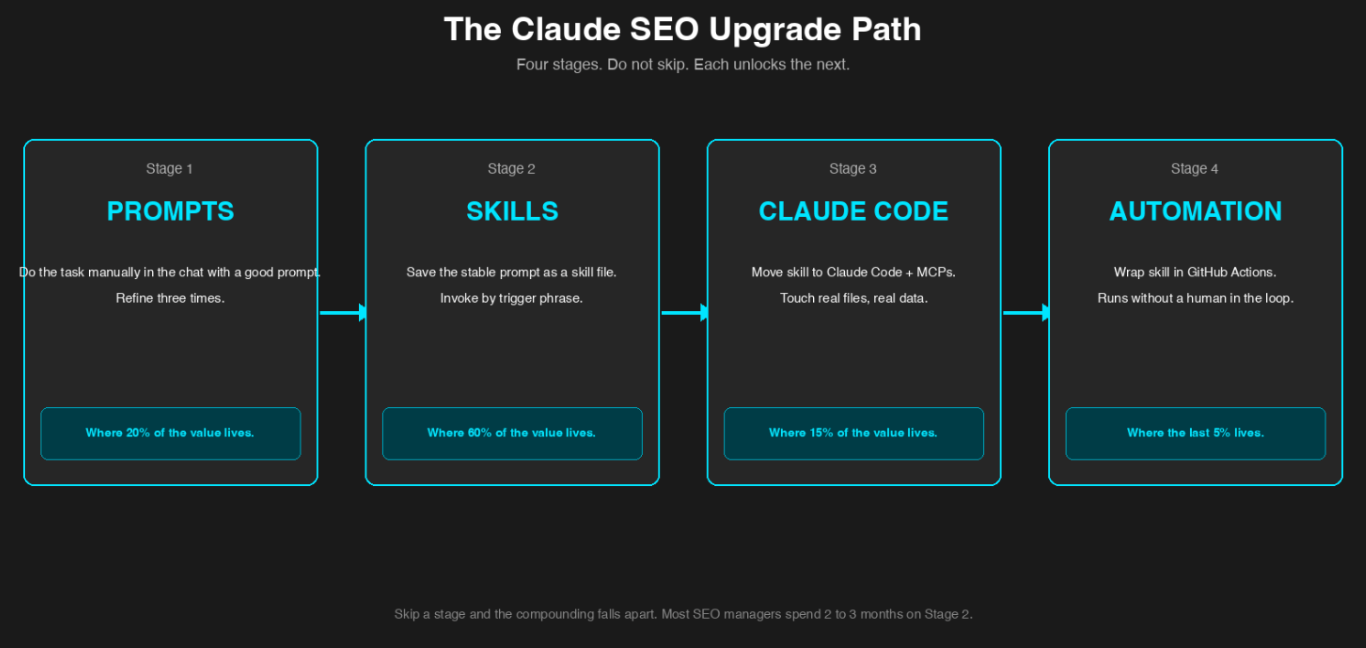
Four stages. Do not skip. Each unlocks the next.
-
Prompts. Do the task manually in the chat with a good prompt. Do it three times. Refine the prompt each time.
- Skills. Once the prompt is stable, save it as a skill file. Invoke by trigger phrase. This is the first big compounding win.
- Claude Code. Once the skill needs to touch real files, run on a schedule, or pull real data, move it to Claude Code. Add MCPs as needed.
- Automation. Once Claude Code is stable, wrap the skill in a GitHub Action so it runs without you.
Each stage of the upgrade unlocks more automation and more repeatability. Each stage also adds setup complexity. Do not upgrade until the current stage is stable.
Do not skip Stage 2. Every SEO manager we talk to who tried to jump straight from prompts to Claude Code with MCPs came back with skills that did not work reliably. Stage 2 is where you learn what a well-specified skill actually looks like, and that knowledge is what makes Stage 3 stick. Most SEO managers spend 2 to 3 months on Stage 2 (skills in Claude Desktop) before moving to Stage 3. That is fine. Stage 2 is where 60 percent of the value is anyway.
Where To Go Next
If you want the strategic view of Claude in SEO, start with the Claude SEO Practitioner's Guide.
If you want the specific skills that actually move rankings, read Claude SEO Skills: The Skills That Actually Move Rankings.
If you are ready to move to Claude Code and want the full technical setup, read Claude Code for SEO: Skills, Automation and MCPs.
Pre-built skills to save you the setup fight are at hawkacademy.co/claude-seo-skills.
FAQ
Which task should I try first?
Task 1 (content audit). It requires the least setup, uses data you already have in GSC, and produces an immediately actionable output. Most SEO managers try it once and are hooked.
Do I need a paid Claude subscription?
For any serious workflow, yes. The free tier does not support projects, custom skills, or file uploads at any scale that matters for SEO. Team or Enterprise plans are what we run internally.
Can I use Claude for local SEO?
Yes. Local audit skills work the same way as domain-level audit skills. Google Business Profile data has to be pulled separately (there is no official GBP MCP yet), but Claude can process the export just like any other data source.
What about privacy for client data?
Team and Enterprise plans include data controls. Client data does not enter the training set. That said, do not paste anything into Claude that would violate a client NDA. When in doubt, anonymise before pasting.
How do I get better at prompting Claude for SEO?
Read what your prompt produced. If the output is bad, the prompt was too vague. Add specificity. Add examples. Specify the output format. Rinse and repeat. Every good SEO skill we run started as a bad prompt that got refined ten times.
Can Claude write link-building outreach for me?
It can draft. It should not send. Journalists respond to human voices, not AI outreach. Use Claude to prepare the list, angle, and first draft. Have a human rewrite before it hits an inbox.
Curious where your brand stands in AI search? Get in touch here.